Sunday, December 6, 2015

Tuesday, December 1, 2015
Tuesday, November 17, 2015

Friday, November 6, 2015
I will present at FETC

ESL Collaboration Connection
 Session Designation: Poster
Session Schedule:
Date: Wednesday, January 13, 2016
Time: 5:30-6:30 p.m.
Location: Poster Area 3 - Exhibit Hall Booth 2500 Session
Description: ELLs should not stand alone; revolutionize collaboration in your district for all learners! Utilize collaboration tools to lead the technology integration charge at your campuses and forge the path to digital transformation. This session will spark your collaborative drive as you rev up your instructional landscape.
Classroom Crashers: An Instructional Overhaul
Session Designation: Poster

Session Schedule:
Date: Thursday, January 14, 2016
Time: 2:30-3:30 p.m.
Location: Poster Area 3 - Exhibit Hall Booth 2500
Session Description: Are your lessons boring? Do you need help integrating technology into your classroom? We will show you how they incorporated this energetic and highly engaging program into their K-12 classrooms. Learn how to take an ordinary lesson into an extraordinary lesson using technology, focusing on collaboration and modeling to enhance student engagement.
Thursday, November 5, 2015


HEALTH & PE
The
health and P.E courses have additional activities that must be completed by all
students taking the original or credit recovery version of these courses.
The lab teacher should maintain record of these completed assignments at least
for the duration of the school year in which the assignments are completed. We
will be using GEO to fulfill these requirements.
Fitness
Exercise Log (Weight of 40%)

For
2015-16, this Fitness Log will be located within the first lesson of the
Edgenuity course under “Online Content” for students to save or print.
The completion score for this component must be entered by the lab teacher
using the “Additional
Activities”
directions.
FitnessGram
Assessment (No weight- required for credit)
Each
student will be required to complete a FitnessGram for the school year in which
Fitness credit is granted. No weight will be awarded in their average,
but it is REQUIRED for credit to be received.
SASP
Teachers: As of August 17th, 2015, we are working with the CIA and
Technology Departments on the streamlined instructions for how the FitnessGram
will be recorded. All HPE Department Heads have the rights to look up
Fitness Gram results for your campus. Please have a campus coach perform
the Fitness Gram test, and we will be sending instructions on who will be able
to enter those results.
Online
Health – Additional Activities
Health
Permission Letter
Health
has an additional permission letter that must be signed by a parent/guardian
before the student is to start the course.
CPR
Requirement:
 Hands-on
CPR is a requirement for most of our current students for graduation.
Many of these students have already received this training. To check to
see if a student has already completed this requirement, please e-mail his or
her counselor. If a student has NOT received the CPR Requirement course in
GEO
has been created to fulfill this requirement, but credit will not be given
until a demonstration to a CPR certified person is complete. Credit
cannot be given to a student until this requirement is complete.
Parenting
and Paternity Awareness (p.a.p.a.) - (Combined weight of 10%)
The
Attorney General of Texas requires that students taking Health also complete
the p.a.p.a requirements. Where the grade weighting of these combined assignments
is only 10%, all p.a.p.a. components MUST be completed before credit is
awarded.
In
addition to finish the Edgenuity course, every student enrolled in the Health
Course has to complete the P.A.P.A requirements in order to gain the credit.
When
the GEO courses is completed, follow the instructions about adding an additional
activity
in Edgenuity.
School
|
Course LINK
|
GHS
| |
SGHS
| |
NGHS
| |
LCHS
| |
NFHS
| |
RHS
| |
SHS
| |
MEM
|
Wednesday, October 28, 2015
GISD 2015 High school Fall Mini-Mester
GISD 2015 High school Fall Mini-Mester
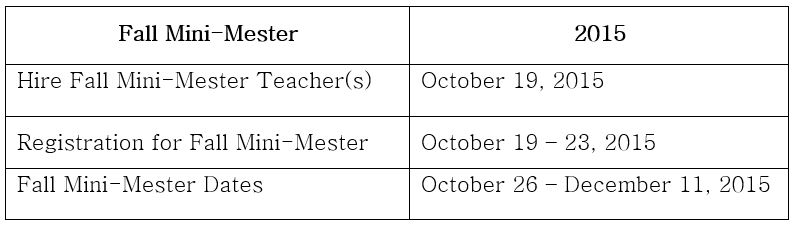
Fall Mini-Mester: Program Description

Fall Mini-Mester
Principal Checklist:
Before:
- Advertise Fall Mini-Mester (Marquis, Call Out, School Website, Student Flyer, Report Card Pickup, Faculty Meeting, Announcements, etc.)
- Review Teacher Expectations (see below)
- Set-up Registration (Registration Form, Policy Agreement Form, AUP if needed)
- Ensure that computer labs have toner, ink, and paper
- Check with CTS for missing AUPs (needed for student login and must be in place before October 26)
- Establish procedure to post credits
During:
- Verify Kronos codes (must use campus funds from Title I and/or SCE)
- Ensure that all grades are posted as students complete course(s)
 Counselor Checklist:
- Collect Registration Forms
- Register Students
- Ensure Fall Mini lab teacher(s) receives a list of all students registered, with course information. It is recommended that a copy of the registration form is provided to the lab teacher.
- Ensure that credits are posted to AAR
Lab Teacher Expectations:
 |
| Document created by: Robyn Webb |
- Collect Policy Agreement Form
- Confirm AUP on file
- Maintain Student Sign-In Sheets and keep in folder/binder
- Maintain computer lab and equipment
- Monitor student progress and ensure students in computer lab are on task
- Contact parents on progress/or lack of and course completion
- Maintain Parent Contact Log and keep in folder/binder
- Complete and submit Course (keep copy in folder/binder)
- Clock in and out in Kronos
Subscribe to:
Posts (Atom)